How much does Augment Code cost in 2026?
Augment Code costs $20 a month on its Standard plan or $100 a month on its Business plan, and both prices cover the whole team, up to 50 seats, with no per-seat charge. The catch is that the monthly fee is also your usage allowance: Standard includes $20 of usage and Business includes $100, and anything beyond that is billed pay-as-you-go. Enterprise is priced by sales, according to the Augment Code pricing page as checked on September 30, 2026.
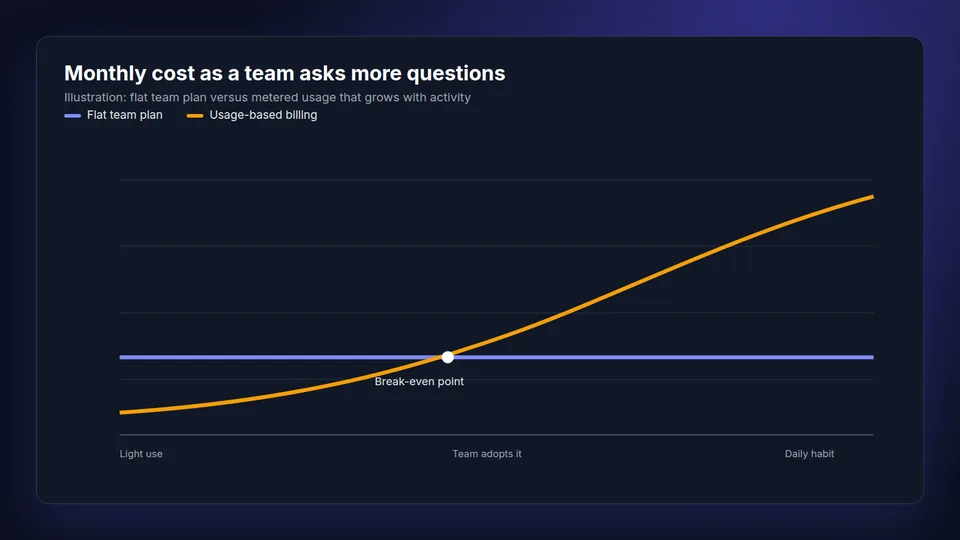
That makes Augment one of the cheapest AI coding tools to start and one of the hardest to budget once a team uses it every day. The rest of this page shows how the usage is metered, what 5, 10 and 20 person teams can expect to pay, and when a flat-price tool is the better buy.
Augment Code plans at a glance
| Plan | Price | Usage included | Seats |
|---|---|---|---|
| Standard | $20 per month, flat | $20 across LLM, Context Engine and compute | Up to 50 |
| Business | $100 per month, flat | $100 across LLM, Context Engine and compute | Up to 50 |
| Enterprise | Custom | Custom usage and top-ups, volume-based annual discounts | Unlimited |
Standard and Business list the same features: the Context Engine, the coding agent, chat, the CLI, MCP and native tools, usage analytics, Cosmos cloud sessions and 50 concurrent sessions. Enterprise adds custom compute sizes, multi-region compute, unlimited concurrent sessions and dedicated support. The plans differ mainly in how much usage you prepay.
How Augment Code usage is billed
Every request is billed as three parts drawn from the same balance, per Augment's token-based pricing docs:
- LLM tokens at the model provider's public API list price.
- A 40% service fee on LLM usage, which Augment says funds the Context Engine and the Cosmos platform. There is no fee on compute.
- Cosmos compute at $0.19 an hour, billed in 5-minute increments, when work runs in a cloud sandbox.
Once the included usage is gone, billing continues automatically at the same rates with no minimum top-up. Augment's own example month on Business is $70 of tokens, a $28 service fee and $2 of compute, which adds up to exactly the included $100. The docs also give sample task costs: about $0.25 to fix an API bug with a Sonnet model, and about $0.85 for a larger design and build task with Opus, both including the 40% fee.
If you read older reviews that list Indie at $20, Standard at $60 and Max at $200 per developer with monthly credits, those describe the October 2025 credit plans. Augment has since moved to the flat team plans and token billing above, so per-developer credit math no longer applies.
What Augment Code costs a 5, 10 and 20 person team
Because usage drives the bill, the honest answer depends on how much the team leans on the agent. The table uses Augment's own $0.25 Sonnet task as a unit and assumes each developer runs a set number of tasks per workday, 21 workdays a month. Treat it as an estimate, not a quote: bigger repos, Opus-class models and Cosmos sessions all raise the cost per task.
| Team and usage | Tasks a month | Usage at $0.25 a task | Likely Augment bill |
|---|---|---|---|
| 5 developers, 3 tasks a day | 315 | about $79 | $100 (Business covers it) |
| 10 developers, 5 tasks a day | 1,050 | about $263 | about $263 ($100 plan plus top-ups) |
| 20 developers, 5 tasks a day | 2,100 | about $525 | about $525 |
| 20 developers, 10 tasks a day | 4,200 | about $1,050 | about $1,050 |
For light use, Augment is inexpensive. For a team where the agent becomes a daily habit, spend follows usage, and the included $100 is used up within the first days of the month. Augment's web dashboard shows usage per team member and per model, which is worth checking weekly during a trial so the first real invoice holds no surprises.
Is Augment Code worth it for your team?
Augment is worth the money when you want an AI agent that edits code, runs tasks in the cloud and works across a large repo. Its Context Engine is the reason teams pick it over lighter assistants, and flat team pricing up to 50 seats is generous if usage stays modest.
It is harder to justify when most of what the team does is ask questions about the code: where is a feature handled, what calls this service, what breaks if a model changes. Those questions still consume tokens and the 40% fee on every answer, and the people who ask the most are often new hires, PMs and support engineers who never touch the agent. If you let an agent run commands against your repos, also plan for guardrails on which tools and data an AI agent can reach, because usage-based agents act on your code, not only read it.
Augment Code alternatives with predictable pricing
If the job is understanding a codebase rather than generating code, a flat-price tool keeps the bill fixed no matter how many questions the team asks.
| Tool | Price | Pricing model | Best for |
|---|---|---|---|
| CodeIndex | $49/month for 5 users or $149/month for 20, billed annually ($99 and $299 monthly) | Flat per team, 1,000 or 10,000 questions included | GitHub teams that want search and cited answers, not an agent |
| Augment Code | $20 or $100 a month plus usage | Flat plan plus metered tokens and 40% fee | Teams that want an AI agent with deep repo context |
| Unblocked | $29 per user a month annually, $35 monthly | Per user | Answers that combine code with Slack, Jira and Confluence |
| Sourcegraph | From $16,000 a year | Enterprise contract | Large estates across many code hosts |
| Sourcebot | Free Basic, Pro $20 per user a month | Per user, self-hosted, your own LLM key | Teams that must keep code on their own servers |
CodeIndex is the code intelligence platform for GitHub teams in that list: it indexes public and private repos and answers plain-English questions with citations to the files and lines it used. It does not write code, and it only supports GitHub, so it complements an agent rather than replacing one. Some teams run both, with the agent for developers and CodeIndex for everyone who needs answers. For more tools in this space, see our comparison of chat with your codebase tools with prices for 5 to 20 users, and the Unblocked pricing breakdown.
How to keep an Augment Code bill under control
- Set the model per task. Augment's docs show lighter models finishing the same fix for a fraction of the cost, so default to a mid-tier model and reserve Opus-class models for design work.
- Watch per-user usage in the first two weeks. One heavy user can consume most of the pool. The dashboard breaks spend down by person, model and activity.
- Keep read-only questions off the agent. Questions like where is this handled or what calls this function are cheaper on a flat Q&A tool than on metered tokens with a 40% fee.
- Ask sales about Enterprise once spend passes a few hundred dollars a month. Enterprise lists volume-based annual discounts and custom usage.
Frequently asked questions
Is Augment Code free?
No. Augment Code has no free plan in 2026. The cheapest option is Standard at $20 a month for up to 50 seats with $20 of usage included, and usage beyond that is billed pay-as-you-go.
Does Augment Code charge per seat?
No. Standard ($20) and Business ($100) are flat monthly prices for up to 50 seats. What grows with the team is usage, billed at model list price plus a 40% service fee on LLM usage once the included amount is spent.
How much does Augment Code Enterprise cost?
Augment Code Enterprise pricing is custom and quoted by sales. It adds unlimited users, custom usage and top-ups, custom and multi-region compute, dedicated support and volume-based annual discounts.
What is the 40% service fee in Augment Code pricing?
Augment adds a flat 40% fee on top of LLM token costs, which it says funds the Context Engine and the Cosmos platform. There is no fee on Cosmos compute, which is billed at $0.19 an hour in 5-minute increments.
What is a cheaper alternative to Augment Code for codebase questions?
For GitHub teams that mainly need search and answers about their code, CodeIndex costs a flat $49 a month for 5 users or $149 for 20 billed annually, with 1,000 or 10,000 questions included. It does not write code, so it fits teams that do not need an agent.