What replaced GitHub Copilot knowledge bases?
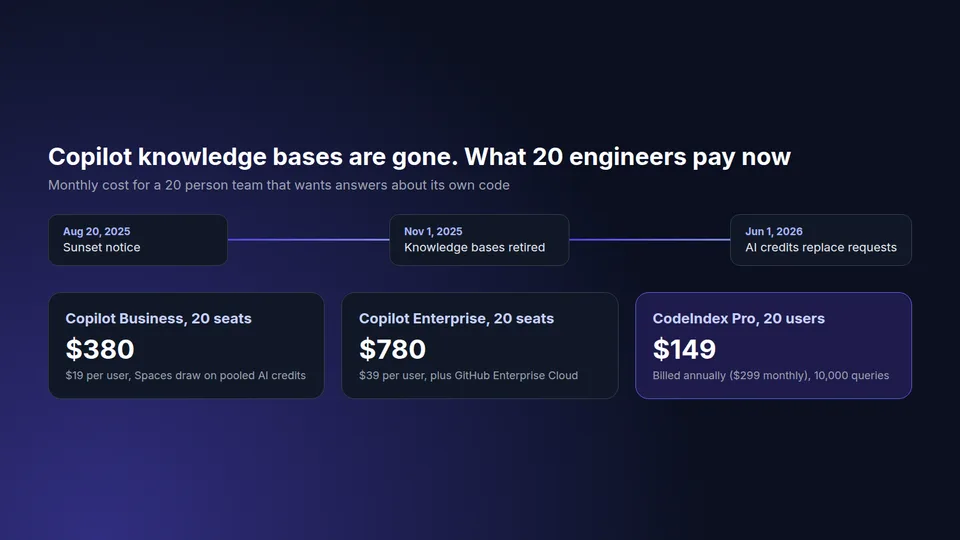
Copilot Spaces replaced GitHub Copilot knowledge bases. GitHub posted a sunset notice on August 20, 2025, moved the retirement date from September 12 to November 1, 2025, and added a Convert to Space button so organizations could migrate each knowledge base into a space before the cutoff. Since November 1, 2025, knowledge bases no longer exist in Copilot Chat.
Knowledge bases were narrow by design. An organization owner on Copilot Enterprise grouped Markdown documentation from one or more repositories, and Copilot Chat answered questions from those docs with links back to the source files. They did not index your application code. Spaces are broader: GitHub's docs say a space can hold repositories, code, pull requests, issues, free text such as meeting notes, images and file uploads, and organization spaces can be shared with admin, editor or viewer access.
How much do Copilot Spaces cost?
Copilot Spaces have no separate price. Anyone with a Copilot license, including Copilot Free, can create a space, and every question asked in a space counts as a Copilot Chat request. On paid organization plans those requests consume AI credits from the enterprise's shared pool, based on the model used and the tokens processed.
That billing model changed on June 1, 2026, when GitHub AI Credits replaced premium request units. One credit is worth $0.01. Copilot Business costs $19 per user per month and includes 1,900 credits per seat. Copilot Enterprise costs $39 per user per month and includes 3,900 credits per seat, and it runs on GitHub Enterprise Cloud. Credits are pooled across the organization, and heavy chat use beyond the pool is billed as overage at the model's API rate.
| Team of 20 | Monthly cost | What you get for codebase Q&A |
|---|---|---|
| Copilot Business, 20 seats | $380 | Spaces, Copilot Chat and code completion; questions draw on 38,000 pooled credits |
| Copilot Enterprise, 20 seats | $780 | Same plus Enterprise features; 78,000 pooled credits; needs GitHub Enterprise Cloud |
| CodeIndex Pro, 20 users | $149 billed annually ($299 monthly) | Semantic search and cited answers over 50 repos, 10,000 queries a month, API access |
If every engineer already has a Copilot seat for completions, Spaces come at no extra license cost and are worth trying first. The math changes when the people asking questions are not the people writing code all day: QA, support engineers, product managers, new hires in their first month. Buying a $19 or $39 seat for each of them just so they can ask where a feature lives is the expensive way to do it.
Is there a Copilot knowledge bases replacement that covers the whole codebase?
Yes. Copilot Spaces can include whole repositories, and dedicated codebase Q&A tools index every file in your connected repos so anyone can ask how the code works and get an answer with file paths and line numbers. The difference is in setup and scope. A space is a curated bundle that somebody has to build and keep current for each topic. A codebase index covers everything you connect and refreshes when the code changes.
Teams that used knowledge bases for a handful of runbooks will be happy with a few well-built spaces. Teams that were really trying to answer questions about their application, not their docs, usually found knowledge bases thin, because the answer they needed lived in a service class and not in a README. That second group is who a code index is for. Our page on how to ask questions about your codebase shows what those answers look like.
Copilot Spaces vs a dedicated codebase Q&A tool
| Copilot Spaces | CodeIndex | |
|---|---|---|
| Who can ask | Anyone with a Copilot license | Anyone you invite, up to 20 users on Pro |
| What it reads | What you add to each space: repos, files, issues, PRs, notes | Every connected GitHub repo, 40 file types, vendor and build output skipped |
| Upkeep | Curate each space by topic | Connect a repo once, reindex on demand |
| Cost model | Per seat plus pooled AI credits | Flat plan, queries included |
| Search by meaning across repos | Within the context of a space | Yes, across all connected repos |
| API for your own tools | Copilot Spaces MCP for IDE agents | REST code search API on Pro and Enterprise |
| Code hosts | GitHub | GitHub |
| Code completion in the editor | Yes | No |
We are honest about the last row. CodeIndex does not write code in your editor and has no IDE extension. If you need completions for everyone, keep Copilot. The question is only whether you also pay Copilot seats for the people who just need answers.
Can I convert a Copilot knowledge base to a space now?
No, not anymore. The Convert to Space button was a migration path offered before the November 1, 2025 retirement, and knowledge bases that were not converted were removed with the feature. If your team missed the window, rebuild the space from the original Markdown repos, which are still in your organization because knowledge bases only pointed at them. Nothing in the repositories themselves was deleted.
Which teams should move off Copilot for codebase questions?
Three situations come up again and again when engineering managers price this out.
Mixed teams. A 12 person engineering group supports a 30 person company where QA, support and product all ask how the system behaves. Seats for all of them cost more than a flat Q&A plan, and most of those people would never use completions. A shared index lets them ask the code directly, and anything that truly needs a person can go through task assignment software that routes each request to the right owner instead of landing on whichever senior engineer answers Slack first.
Onboarding-heavy quarters. When you hire several engineers at once, the bottleneck is how fast they understand the codebase, not how fast they type. A developer onboarding tool that answers with file citations shortens that ramp without curating a space for every subsystem.
Teams that want to build on it. If you want a Slack bot, a support console or an internal portal to answer code questions, you need an API with predictable cost. Credits that scale with tokens are hard to budget for a bot that the whole company can call.
How to replace Copilot knowledge bases in an afternoon
- List the questions your knowledge bases used to answer. Pull them from Slack threads and old Copilot Chat sessions if you can. They tell you whether you need docs, code or both.
- If the answers lived in Markdown docs, rebuild them as Copilot Spaces and share them with the org. That costs nothing extra for people who already have seats.
- If the answers lived in code, connect the repos to a codebase index. With CodeIndex you paste a GitHub URL in the box at the top of this page, sign in with GitHub for private repos and the index is usually ready within minutes.
- Run the same ten questions through both and compare which answer cites the right file. That test takes 20 minutes and settles the decision better than any feature list.
- Invite the non-coding people who asked most of those questions, and watch whether they stop pinging senior engineers during the 14-day trial.
For a broader shortlist of tools that answer questions about code, see our comparison of chat with your codebase tools with team pricing for each.
Frequently asked questions
Are GitHub Copilot knowledge bases deprecated?
Yes. GitHub retired Copilot knowledge bases on November 1, 2025 after a sunset notice on August 20, 2025, and replaced them with Copilot Spaces. Knowledge bases that were not converted to spaces before that date were removed.
Do Copilot Spaces replace knowledge bases?
Yes. Copilot Spaces are the official replacement. They hold more than Markdown docs, including repositories, code files, issues, pull requests, notes and images, and can be shared with an organization at admin, editor or viewer level.
How much do Copilot Spaces cost?
Copilot Spaces are included with any Copilot license, including Free. Questions in a space count as Copilot Chat requests and consume AI credits based on model and tokens, drawn from the pooled credits of Business ($19 per user) or Enterprise ($39 per user) plans.
Did Copilot knowledge bases index source code?
No. Knowledge bases grouped Markdown documentation from selected repositories. They answered from docs, not from your application code. Spaces and codebase Q&A tools can work from the code itself.
What is a cheaper Copilot knowledge bases replacement for a whole team?
If many of the people asking questions do not need code completion, a flat-price codebase Q&A tool is cheaper than adding Copilot seats. CodeIndex Pro covers 20 users, 50 GitHub repos and 10,000 queries a month for $149 a month billed annually.