Semantic code search engine for GitHub teams
Semantic Code Search Tool and Search Engine for GitHub Repos
Keyword search only works when you already know what the code is called. Semantic code search works from what the code does. Type "where do we retry failed webhooks" or "which job sends the invoice email" and CodeIndex returns the files and line ranges that match the meaning, even when none of your words appear in them.
14-day trial with Pro features. Paste a GitHub repo URL to start indexing.
Short answer
A semantic code search tool indexes a repository as vector embeddings so you can find code by describing its behavior in plain English instead of matching exact strings. CodeIndex is a hosted semantic code search engine for public and private GitHub repositories: it indexes 40 file types on the branch you pick, returns the file, line range, snippet and a relevance score for each match, and answers follow-up questions with citations. Plans cost $49, $149 or $499 a month billed annually, flat for the team, with no per-seat fee.
40
File types indexed, from PHP, Go and TypeScript to SQL, YAML and Markdown
Up to 50
Results per query, each with file path, line range and score
20 users
On Pro for one flat price, no seat math
$49/mo
Starter billed annually ($99 month to month)
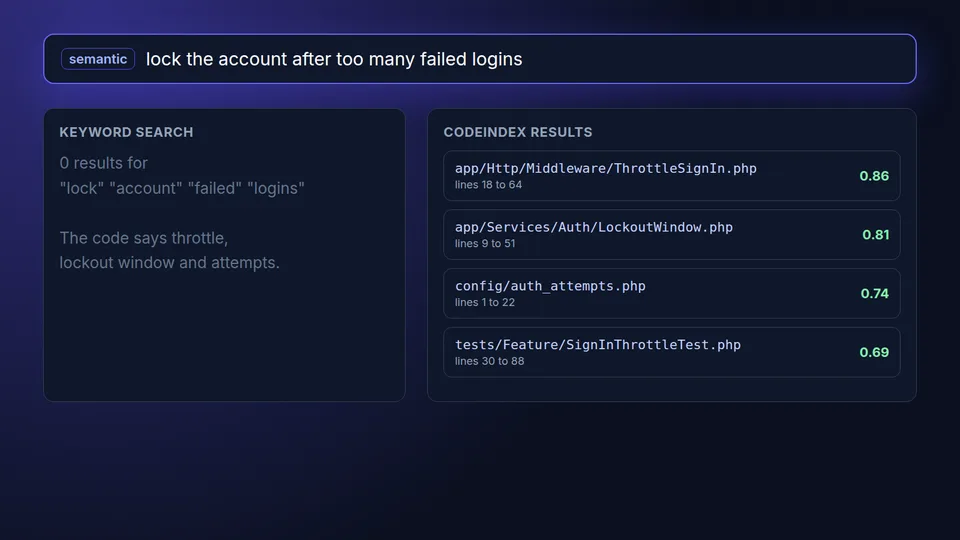
Search for what the code does, not what it is named
Most time lost in a codebase goes to the first step, finding the right file. The person asking knows the behavior ("the thing that locks an account after five bad logins") but not the class name somebody picked three years ago. Semantic search closes that gap, so a new hire, a QA lead or a senior engineer working outside their usual service lands on the right code in one query instead of ten greps.
What the CodeIndex semantic code search tool does
Everything below runs on one shared index per repository, so the whole team searches the same thing.
Natural language queries
Ask in plain English, up to 500 characters. The query is embedded and compared against every chunk of your code, so synonyms, different naming and indirect phrasing still find the match.
File and line results
Each hit comes back with the file path, start and end line, the code snippet, the language and a relevance score. You open the exact spot, not a whole file.
Private GitHub repos
Sign in with GitHub and index private or public repositories. Pick main, develop or a release branch instead of being stuck on the default branch.
Answers with citations
When search is not enough, switch to Q&A. CodeIndex explains how a flow works or sketches the architecture and cites the files it used, so you can check every claim.
Clean index
node_modules, vendor, build and dist folders, minified bundles, source maps and lockfiles are skipped, so results come from code your team wrote.
Search API
On Pro and Enterprise, the same search is a REST endpoint with Bearer keys. Put it behind a Slack bot, an internal portal or an AI agent.
Semantic code search tools compared for a GitHub team
Here is how the realistic options stack up for a 5 to 20 person team whose code lives in private GitHub repositories.
| grep or ripgrep | GitHub code search | Local open source CLI | Gemini Code Assist Enterprise | CodeIndex | |
|---|---|---|---|---|---|
| Finds code by meaning | No, exact text or regex | No, keywords, symbols and regex | Yes | Yes, inside code suggestions | Yes |
| Who can use it | Whoever has a clone | Anyone with repo access | The person who installed it | Licensed IDE users | Every user on the plan, plus API |
| Branch coverage | Any local branch | Default branch only | Any local branch | Indexed repos, reindexed every 24 hours | Branch you choose per repo |
| Setup and upkeep | None | None | Install, embeddings key, reindex per laptop | Google Cloud project, Developer Connect, admin setup | Paste a repo URL |
| Plain-English answers with citations | No | No | Rarely | Chat in the IDE | Yes |
| Price for 20 people | Free | Included with GitHub | Free tools plus embedding costs and time | $45 per user per month annual, about $900 a month | $149 a month billed annually |
GitHub code search limits from docs.github.com. Gemini Code Assist Enterprise price from cloud.google.com/gemini/pricing ($0.061643836 per user hour on a 12-month commitment, about $45 a month) and code customization details from Google's documentation, checked October 2026. CodeIndex indexes GitHub only, not GitLab or Bitbucket, and has no self-hosted edition.
How semantic code search works in CodeIndex
-
1
Paste a GitHub URL
Use the box at the top of this page, create your account and connect GitHub so CodeIndex can read the private repositories you choose.
-
2
Pick the branch
CodeIndex clones that branch, filters out generated and vendored files and keeps source files up to 1 MB.
-
3
Index into embeddings
Files are split into overlapping chunks of about 1,500 tokens, each chunk becomes a vector embedding, and the index is stored for your team.
-
4
Search and ask
Type what you are looking for. Results show file, lines and score. Ask a follow-up and get an answer that cites the files behind it.
Who pays for a semantic code search engine
Teams that hire every quarter
New engineers spend their first weeks asking where things live. Letting them search by behavior cuts the number of interruptions seniors absorb.
QA, support and product people
They know what the app does but not what the code is called. Semantic search lets them confirm a rule or find the error message source without a ticket to engineering.
Engineers outside their own service
Even seniors are new in code they did not write. Searching by meaning beats guessing class names in a repo you open twice a year.
Teams building internal AI tools
Bots and agents need retrieval over your code. The search API hands them the right chunks instead of the whole repository.
What is semantic code search
Semantic code search is a way to find source code by its meaning instead of its exact text. The tool converts each piece of code into a vector embedding, converts your query the same way, and returns the code whose vectors sit closest to the query. That is why "cancel a subscription at period end" can find a method called scheduleDowngrade that never uses the word cancel.
Traditional tools such as grep, ripgrep, OpenGrok and GitHub's own search box are lexical. They are fast and precise when you know the string. They fail when you only know the behavior, which is the normal situation for anyone new to a codebase.
Is semantic code search better than grep
Semantic code search is better than grep when you know what the code does but not what it is called, and grep is better when you know the exact identifier. Most teams want both. Use grep for renames and exact error strings, and semantic search for questions like "where do we calculate sales tax" across a repo you did not write.
In practice the two complement each other. A semantic hit tells you which file and function to open, and from there your editor's go to definition and grep do the rest.
Does GitHub have semantic code search
GitHub's code search box is lexical. It supports keywords, symbols, qualifiers and regular expressions, searches the default branch, caps results and skips large files. Copilot can build a semantic index of a repository for Copilot Chat, but that is tied to Copilot seats and to the editor or github.com chat.
If only some of the people who need answers have Copilot seats, a shared semantic index that anyone on the team can query is usually cheaper than buying more seats. See how CodeIndex compares on the GitHub code search alternative page.
Can I use semantic code search on private repositories
Yes. CodeIndex indexes private GitHub repositories after you connect your GitHub account, and each repository belongs to your team only. Self-hosted tools also work on private code but you run the servers and pay for embeddings and an LLM yourself. Gemini Code Assist Enterprise can index private repositories for its code customization feature, licensed per developer seat.
How much does a semantic code search tool cost
Open source command line tools are free to download, then you pay in embedding API costs and the hours to keep an index fresh on every laptop. Per-seat assistants that include repository-aware search run from about $19 to $45 per developer per month on annual terms. CodeIndex charges a flat team price: Starter $49 a month for 5 users and 10 repos, Pro $149 for 20 users, 50 repos and API access, and Enterprise $499 for unlimited users, all billed annually. Monthly billing is $99, $299 and $999.
Frequently asked questions
What is the best semantic code search tool?
For a GitHub team that wants one shared index without running servers, a hosted tool like CodeIndex is the simplest choice, with file and line results, cited answers and an API from $49 a month billed annually. Developers searching a single local clone often prefer an open source CLI, and companies already on Google Cloud may use Gemini Code Assist Enterprise.
How does semantic code search work?
The tool splits your code into chunks, turns each chunk into a vector embedding that captures what it does, and stores those vectors in an index. Your query is embedded the same way, and the closest chunks are returned as results. CodeIndex uses chunks of about 1,500 tokens with a 200 token overlap.
Is there a semantic code search engine for GitHub?
Yes. CodeIndex is a semantic code search engine built for GitHub. You paste a repository URL, connect GitHub for private repos, choose a branch and search by meaning within minutes. It does not support GitLab or Bitbucket.
Can non-engineers use semantic code search?
Yes, and that is a common reason teams buy it. QA, support and product managers can describe a behavior in plain English and get the file that implements it, or ask a question and get an answer that cites the code.
Does semantic code search replace grep?
No. Semantic search finds code by meaning and is best for discovery. Grep finds exact strings and is best for renames and error messages. Most engineers use semantic search to find the right place and grep or go to definition from there.
Is there a semantic code search API?
Yes. CodeIndex Pro and Enterprise include a REST search endpoint that takes a query and returns up to 50 results with file path, line range, snippet, language and score. It is authenticated with Bearer API keys.
Is there a free trial?
Yes. Every new account gets a 14-day trial with Pro features, so you can index a real private repository and run real queries before you pay.
Search your GitHub code by meaning
Paste a repository URL, pick a branch and run your first semantic query in minutes. 14-day trial with Pro features.
Related reading
Code indexing tool
How the shared index is built and kept fresh.
Source code search engine
One search box for your private repos.
Code search API
Semantic search for bots, portals and agents.
GitHub code search alternative
Where GitHub search stops and what to use instead.
Ask questions about your codebase
Plain-English answers with file citations.
Gemini Code Assist pricing
Standard and Enterprise per-seat costs for a team.